Most advice on showing up in ChatGPT and other AI tools starts with “publish more content.” I start somewhere else: with the content you already have. Before I suggest a single new page, I want to know what your site says today, whether it says it consistently, and how well it answers the questions your buyers actually ask.
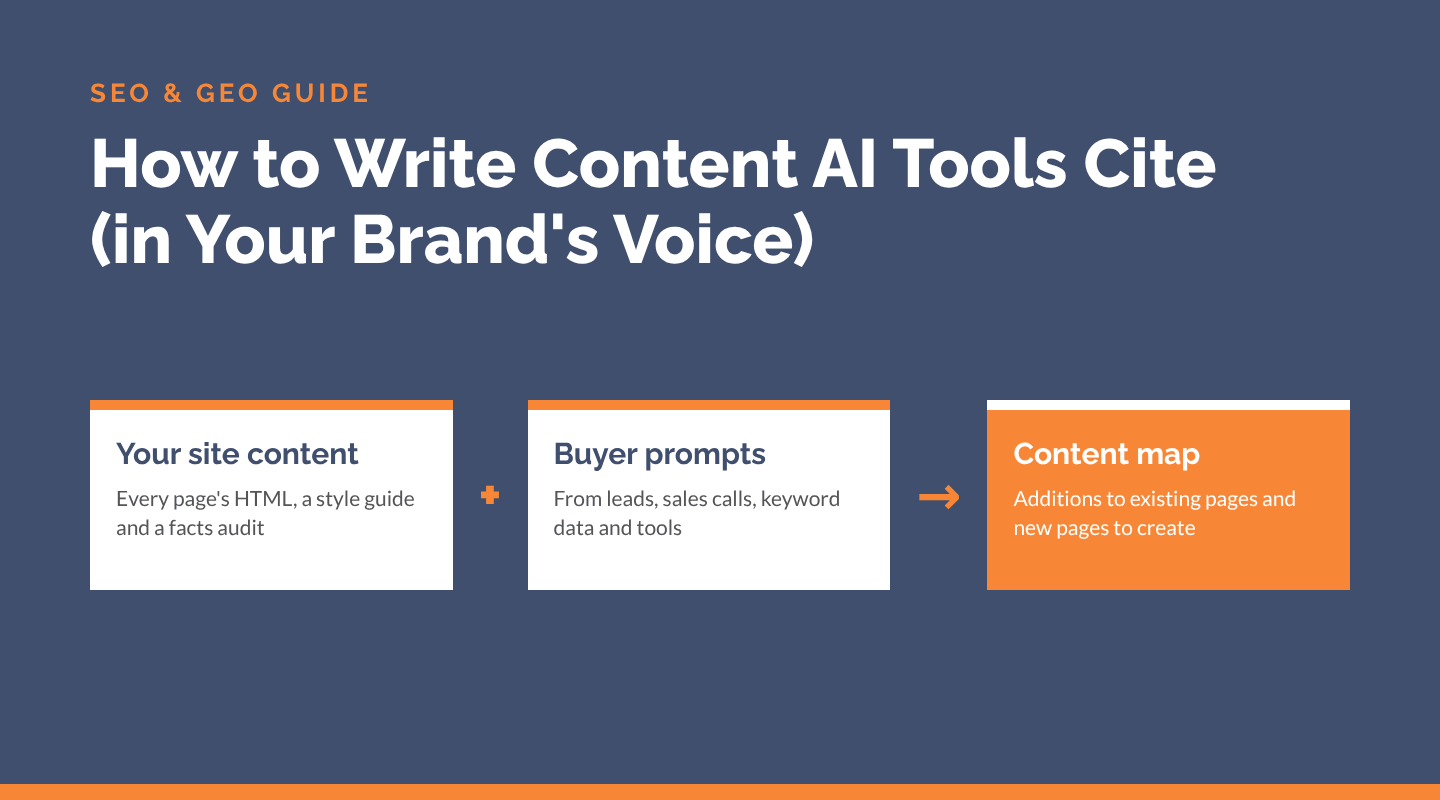
This is the process I use for SEO and GEO (generative engine optimization) content work. It produces a list of additions to existing pages and new pages to create, all written in your brand’s voice and mapped to real buyer prompts.
Why Start With Your Own Website?
Because that’s what AI tools cite most. In our AI search citation study of 1,044 AI answers, 84% of citations went to the websites of the companies being recommended. Brands whose own site was cited were recommended 96% of the time, compared to 18% when their site wasn’t cited.
Blog posts earned only 6.9% of citations. Homepages, service, About and product pages did most of the work. So the pages you already have are usually the best place to start.
Step 1: Get All of Your Site Content in One Place
You can’t improve what you can’t see in one view. I start by getting the HTML of every page, either as an export from the CMS (WordPress has a built-in export tool) or by crawling the site.
If you crawl, Screaming Frog can store both the raw HTML and the rendered HTML of each page. Comparing the two is a quick way to find content that only appears after JavaScript runs. Many AI crawlers don’t run JavaScript, so anything that only loads client-side may be invisible to them.
Tip: Keep the crawl export. You’ll use its indexability columns again in Step 5.
Step 2: Build an Editorial Style Guide From What’s There
Write “show,” not “showcase” or “demonstrate”
With all of your content in front of you, patterns jump out: the words your best pages use, how you describe your services, and where the tone drifts from page to page. I turn those patterns into a written style guide for the brand.
A useful style guide covers:
- Voice: A few plain traits, like “friendly, direct, no hype,” with an example of each.
- Word choices: A short list of “write this, not that” rules, plus the terms you always use for your products and services.
- How you describe the company: One approved description of who you are, who you serve and what makes you different.
- Phrases and habits to avoid: Filler, buzzwords and anything that doesn’t sound like you.
- Before and after examples: Real sentences from your site, rewritten in the target voice.
Every page update and new page then reads like the same company wrote it. That matters for people, and it also means AI tools see your company described the same way everywhere.
Step 3: Run a Company Facts Consistency Audit
| Fact | Homepage | About page | Status |
|---|---|---|---|
| Founded | 2012 | 2012 | Match |
| Locations | 5 | 4 | Conflict |
| Review rating | 4.9 (210) | 4.8 (180) | Conflict |
| Services | 6 listed | 6 listed | Match |
AI tools repeat what they read. If your About page says you were founded in one year and your homepage says another, or one page lists five locations and another lists four, you’ve given them two answers to choose from.
Go through every page and pull out each company fact, such as:
- Founding year, years of experience and team size
- Locations and service areas
- Services, products and who you serve
- Pricing and minimums
- Review counts, ratings, awards and certifications
- Client results and other stats
List each fact, the pages it appears on and the value on each page. Then fix the conflicts and outdated numbers, starting with the pages that get the most traffic. Some companies also publish a single company facts page as the source of truth for AI tools, journalists and anyone else researching them.
Check your offsite profiles (LinkedIn, Google Business Profile, directories and review sites) for the same facts while you’re at it.
On a free 30-minute call, we’ll talk through your site and goals.
Step 4: Build Sample Prompts From Real Buyer Language
The prompts you track and optimize for should sound like your buyers, not like a keyword list. I build them from several sources:
- Messages from leads: Contact form submissions and inbound emails show the exact problems and questions people bring to you.
- Sales call transcripts: These surface the objections, comparisons and “how much does it cost?” questions that come up before someone buys.
- Keyword data: Search Console queries (especially longer, question-style ones) and keyword research tools show demand at scale.
- Third-party tools: AI prompt tracking and research tools suggest prompts and show which brands and sources AI tools mention for your category.
Then group the prompts by persona (who’s asking) and buying stage. In our citation study, visibility swung by up to 80 points depending on the buyer persona, but only about 7 points based on how the prompt was worded. Who’s asking matters more than the exact phrasing.
Step 5: Map Your Prompts to Your Indexable Pages
| Prompt | Best page | Coverage | Action |
|---|---|---|---|
| How much does [service] cost? | /pricing/ | Partly | Add cost ranges |
| [Brand] vs. [competitor] | None | No | Create a new page |
| Best [service] for small teams | /services/ | Yes | Keep |
Now compare the two lists. Start with your indexable pages from the crawl in Step 1 (pages that return a 200 status, aren’t set to “noindex” and aren’t canonicalized to another URL). Then match each prompt to the one page that should answer it best.
A simple spreadsheet works well:
| Column | What goes in it |
|---|---|
| Prompt | The buyer’s question, in their words |
| Persona and stage | Who’s asking and how close they are to buying |
| Best page | The indexable URL that should answer it (or “none”) |
| Coverage | Answered, partly answered or not answered |
| What’s missing | The specific facts, numbers or answers to add |
| Action | Add to existing page, or create a new page |
The gaps tend to repeat. Pages often skip cost, comparisons with alternatives, who the company is best for, credentials and specific results. When no page fits a group of prompts, that’s a new page to create, such as a cost page, a comparison page or a page for one audience.
Step 6: Write the Additions in Your Brand Voice
With the map done, each content update has a clear brief: the prompts it needs to answer, the facts to use (from Step 3) and the voice to write in (from Step 2). A few habits make the new content easier for Google and AI tools to quote:
- Answer the question in the first sentence or two, then explain.
- Use headings that match how people ask, often as a question.
- Use real numbers instead of adjectives (“168 form fills vs. 37” beats “a big increase”).
- Add FAQs, comparison tables and schema where they fit.
- Put important content in the HTML itself, not behind tabs or scripts that only load client-side.
Prioritize your commercial pages first (homepage, service or product pages and About page), since those earn the most citations.
Step 7: Track What Changes
Track your prompts over time to see how often AI tools mention you, where you rank in their answers and which sources they cite. I usually start with ChatGPT, since it sends most of the AI referral traffic I see in client GA4 reports. Pair that with AI referral traffic, leads and revenue in GA4, so you can tie visibility to results.
AI answers change by user, model and day, so look for trends across your full prompt set rather than reacting to a single answer.
If you’d like help mapping your content to the prompts your buyers ask, see our LLM optimization services or contact me.





