Updated October 2026. I first wrote this post in 2017. The core advice still holds, and I’ve added what mid-sized stores need to do to show up in AI shopping answers from ChatGPT, Gemini, Perplexity and Google’s AI Mode.
I’ve spent most of my 20+ years in SEO optimizing eCommerce sites to compete against Amazon and other big online retailers. I can’t tell you how gratifying it is to see a mid-sized store outrank a big box retailer, or at least grow traffic and revenue month after month. It doesn’t happen overnight. It happens slowly, steadily…and consistently.
Mid-sized stores have one big advantage: they’re usually more nimble. They can shift budget and strategy quickly when they spot a weakness in a larger competitor. If you run a mid-market eCommerce site and you’re struggling with SEO, use these eCommerce SEO tips to start growing your organic traffic and revenue.
eCommerce SEO Tips at a Glance
- Improve your product pages
- Remove “zero traffic” product pages from Google’s index
- Improve your top product pages
- Plan to improve the rest
- Clean up your index
- Optimize category pages
- Create buying guides
- Publish articles that help people choose and use your products
- Get your products into AI shopping answers
Ready? Let’s dive in!
Improve Your Product Pages
Product pages usually have the highest conversion rates. They’re “where the money is” in eCommerce. They’re also what AI tools cite most for stores: in my AI search citation study, product and collection pages earned 44% of company-site citations in consumer eCommerce.
If you use the same manufacturer descriptions as other stores (especially competitors), you’re limiting how much value your product pages add for Google. If your descriptions are thin, you’re likely hurting how Google sees your site’s overall quality.
Remove Product Pages with Zero Search Traffic from Google’s Index
You heard me. Find the product pages that haven’t driven any organic search traffic and remove them from Google’s index. Keep them on your website, but add a “noindex” meta robots tag to product pages that haven’t earned a single organic visit in the past 12 months (adjust for seasonality).
Before you do, check Google Search Console too. A page with no clicks but steady impressions may be close to ranking, and is worth improving instead.
Get rid of the cruft. These products aren’t “working” for your site, and they may be dragging down your overall quality in Google’s eyes. By removing them from the index, you raise the share of strong content Google sees. You can always add them back once you’ve improved them.
Still uneasy about this? Read this Moz article, which covers a client I directed the SEO strategy for at Inflow before starting my own consulting practice. We pruned 50% of a mid-sized eCommerce client’s product pages and increased organic search traffic by 28% in a relatively short time. Results don’t always come that quickly, but they can.
Improve Your Top Product Pages
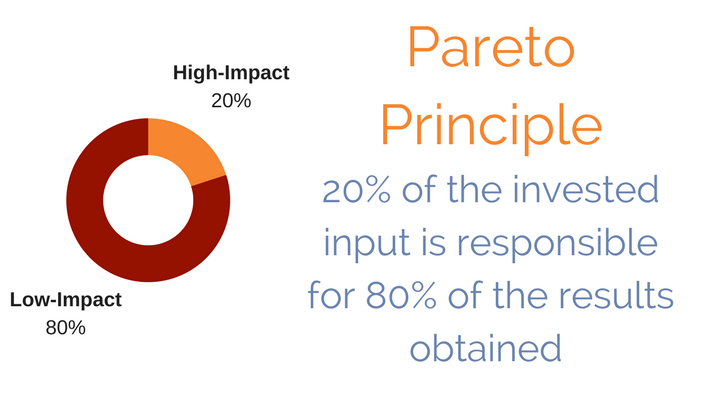
Focus on the 80/20 rule here. It’s highly likely that 20% of your product pages drive 80% of your revenue.
Make sure your top product pages are 100% unique. That’s not enough, though. You also need to show why each product is worth someone’s hard-earned money…and why they should buy it from you.
You can’t beat Amazon on shipping speed. What you can offer is a real point of view and expert insight on products you hand-picked because you know your field. People buy from stores they trust, and sharing that insight is what sets you apart from the big box retailers.
On each top product page, I’d add:
- Who it’s best for (and who should pick something else). “Best for beginners on a budget” is the kind of statement both shoppers and AI tools pick up on.
- Specific facts: dimensions, materials, compatibility, what’s in the box, warranty length. In my study, the #1 brand in an AI answer was nearly 4x as likely as brands ranked sixth or lower to be described with a concrete number.
- Answers to common questions your customer service team hears about the product.
- Reviews that load in the page’s HTML, not only through a JavaScript widget.
Plan to Improve the Rest
You’ll likely be left with a large share (perhaps 40-75%) of your products that drive enough organic traffic and revenue to keep indexed, but still need work.
This is where you need a long-term plan. Figure out how long it’ll take to improve and rewrite these pages, and what it’ll cost. What’s realistic? It’s perfectly okay if this takes a year or two. Your organic traffic will be growing well before then, and the ongoing work keeps fueling growth.
After improving your top product pages, you’ll know whether you can handle this in-house or need outside help. If you outsource (with someone like me, perhaps?), stay involved. Remember…you’re the expert (or your staff is). Share your insight on each product with your writers, so the descriptions are unique, compelling and accurate.
Note: AI writing tools can help speed this up, but don’t publish AI drafts as-is. Mass-produced descriptions that sound like everyone else’s won’t stand out to shoppers, Google or AI tools. Your team’s expertise is the part that makes them worth reading.
Clean Up Your Index
For years, Google’s updates (from Panda to today’s core updates) have focused more and more on overall site quality. Google rewards sites that give searchers a good experience and demotes sites that don’t. That’s why it’s important to only let Google index your quality content. Page types like these should be kept out of (or removed from) Google’s index with noindex tags, canonical tags, robots.txt rules, or by deleting and redirecting them to better, related pages:
- Filter and facet URLs (except filters that match real searches)
- Internal search results pages
- Category pages with very few products
- Short, outdated blog posts that don’t help shoppers
- Tag pages with no unique content
- Random blank or test pages
I go deeper on this in my post on index bloat.
Optimize Category Pages
Category pages usually target topics with more search volume than product pages, but those topics are also more competitive. It’s often easier for a mid-sized store to rank a product page for a specific product name than to rank a category page for a broad topic like “office desks” or “guitar amps.” There’s simply less competition.
When I first wrote this post, Pro Guitar Shop (my favorite online guitar shop!) was a great example. It ranked near the top for specific pedal names thanks to excellent, mostly unique product copy and reviews, but it was nowhere near the top for the broader “overdrive pedals” category search, which Guitar Center owned.
Add Unique Content Above the Product Grid
Beyond the title tag and H1, add a short intro (50-150 words) above the product grid that describes what’s in the category and who it’s for. Link to top-selling products and related subcategories.
Curate Recommended Products Below the Product Grid
The bottom of a product grid is often forgotten. If a shopper scrolls all the way down, they probably still haven’t found the right product. That’s your chance to help with a short section (200-300 words) that recommends the best sellers or the best picks for specific uses, like “best for small spaces” or “best for beginners.”
This helps shoppers and gives Google and AI tools more context about the products, including the “best for” language that shows up in AI recommendations.
When I first wrote this post, a great example was the air conditioner category page at Total Home Supply, an Inflow client I worked on. Below the product grid, it recommended specific models for different room sizes and needs.
Tip: Make sure this content is in the page’s HTML when it loads. Some eCommerce themes load category descriptions or product grids with JavaScript, and most AI crawlers can’t see that content.
Create Buying Guides
Your customers’ biggest challenge is finding the right product for their needs. Buying guides make that easier and give you a great way to recommend specific products.
Although not a mid-sized store, REI’s expert advice section has always impressed me. Guides like “how to choose a backpack” offer real advice, compare features and recommend specific products that can lead to a sale.
REI is a big brand, but mid-sized stores can do the same. Maybe not as many guides or as fast, but you can bring your own perspective, which is exactly what shoppers (and search engines) value.
Build guides around how people actually shop: by budget, experience level, use case or who they’re buying for. That matches the long, specific questions people now type into AI tools (“what’s the best backpack for a 3-day hike under $200?”).
Publish Articles That Help People Solve Problems with Your Products
A few years back, I was researching how to soundproof my music room. I kept landing on the website for Trademark Soundproofing. They had an article for every question I had, like “how to soundproof a door.”
Note: I tried my darndest to give them my business, but their customer service let me down. I called to place a multi-thousand-dollar order, and they weren’t taking orders for 1-2 weeks. If they had been ready, they would have gotten the sale.
Still, that’s how eCommerce sites do content marketing. Target the questions and needs of your potential customers, and create helpful content that educates them and recommends products along the way. You’ll build trust, attract links and give AI tools something worth citing.
Get Your Products into AI Shopping Answers
More shoppers now ask ChatGPT, Gemini, Perplexity and Google AI Mode what to buy. Here’s what helps your products show up:
- Keep your Google Merchant Center feed accurate, with correct prices, availability, GTINs and sale prices. It feeds Google Shopping results and AI Mode.
- Add Product schema with price, availability, brand and review ratings.
- Make sure AI crawlers can read your product pages. Most don’t run JavaScript, so key details (price, specs, reviews, descriptions) need to be in the raw HTML. Don’t block OAI-SearchBot, PerplexityBot or Claude-SearchBot in your robots.txt or firewall.
- Keep your shipping, returns and FAQ pages current. In my study, FAQ and policy pages earned 12% of company-site citations in consumer eCommerce.
- Track AI referral traffic and revenue in GA4. For one of my eCommerce clients, revenue from AI referrals grew 7x in a single quarter (from about $3,000 to $21,000).
What Matters Is Effort and Output
The hard part is finding the time to do the work, and making sure it gets done well. Thinking about these tips won’t change your traffic or revenue. Meet with your team, decide who has the expertise to handle each part of the plan, and get started. If you don’t have the expertise in-house, hire someone like me. See my eCommerce SEO and GEO services for how I help mid-sized stores compete with the big box retailers.





