TALK TO US:
 Ever since February 24th, 2011, Google has made it clear that they are taking no prisoners in their quest to provide the best possible search results. Many black and great hat SEO experts, ignorant webmasters, and even all around good guys and gals are learning (the hard way) that what’s in Google’s quality guidelines should be followed strictly (and immediately).
The Google Panda algorithm update is focused on quality, rewarding sites with a high percentage of engaging unique content, and filtering out sites with the opposite. Google’s recent Penguin algorithm update, however, is primarily targeting web spam such as over optimization and link schemes designed to skew search results. It’s believed that both updates partially target duplicate content to some degree, but there’s little proof of this.
The question, however, is how do you find out if you were penalized by either of them…and which particular update it was? Sometimes traffic may slowly decline amidst multiple updates, so identifying the exact start of the problem can be difficult at times.
Use Webmaster Tools to Identify Google Penalties
The image below shows two separate traffic declines for a website that was targeted by various Google algorithm updates in the first half of 2012.
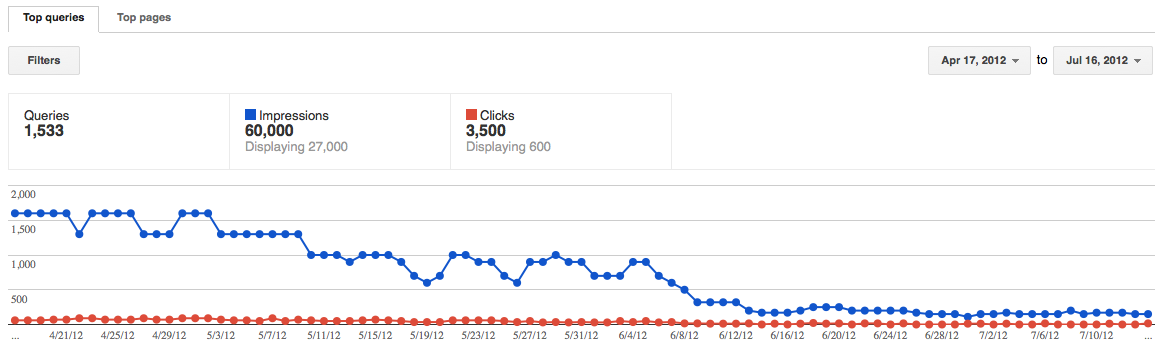
The key to identifying which of Google’s algorithm updates have targeted your website is simple. Compare dates between traffic declines and algorithm changes. Navigate to Traffic Sources > Search Queries in Google Webmaster Tools (setting your start date back as far as it will go), look for traffic dclines, then take a quick look at the SEOmoz Google Algorithm Change History. In this case, one can quickly identify two key drops:
- Late April: Google Panda 3.6. Apparently a refresh and thought to be minor, but this site was clearly targeted. It’s possible this was still a Penguin update that kicked in a bit later, but this site wasn’t over-optimized, didn’t partake in link building schemes, and generally didn’t fit the bill of a Penguin victim.
- Early June: Google Panda 3.7. This one was apparently more significant than 3.6, and the the graph above clearly indicates so. This was the kick in the gut while the site was already down on the ground.
Another important part of the process is to compare organic search traffic, within Google Analytics, to confirm that traffic actually dropped as well. Sometimes these Webmaster Tools graphs don’t pair up with the Analytics traffic. If they are similar, however, take a look at a time period of 1+ weeks, both before and after the point of decline. Ensure that you didn’t simply lose traffic from a few keywords, since Panda is a site-wide penalty. If most of your site’s pages have dropped in traffic, then this is a good indication that your site was hit by Panda.
Use Google Analytics to Identify Traffic Penalties
1/26/2014 Update: The following “deep dive” SEO metrics can help you to analyze what is causing downward or upward movement in our website traffic…and thus, confirm if it was due to a particular algorithm update.
- Traffic Source – What is the source of traffic change? Organic? Referral? Direct?
- Organic: Specific Keywords – If Organic, which keywords are driving the change? Compare pre/post time periods in Acquisition > Keywords > Organic. Primary Dimension: Keywords. Note: This is no longer possible in Google Analytics since Google has changed to secure search. Instead, look at the search queries in Google Webmaster Tools.
- Organic: Specific Landing Pages – If Organic, which landing pages are driving the change? Compare pre/post time periods in Acquisition > Keywords > Organic. Primary Dimension: Landing Pages. Also consider going to Behavior > Content Drilldown and using the Non-Paid Search Traffic advanced segment to look for traffic decline/incline patterns by URL directory.
- Organic: Search Queries + Number of Keywords in Google Analytics – Google Panda penalties are often site-wide. So, if you see the blue Search Queries graph sharply decline in Google Analytics (Acquisition > Search Engine Optimization > Queries), and the number of keywords (compared pre/post) drop off in Google Analytics (Acquisition > Keywords > Organic…look at bottom right of page to see # of keywords), then this is an indicator that the site might have been penalized. Duplicate content is the first area to investigate (conduct Moz crawl reports, look at HTML Improvement data in Webmaster Tools, and potentially run Copyscape reports).
- Organic: Average Position – In Google Analytics, go to Acquisition > Search Engine Optimization > Queries and look at the Average Position column. Compare pre/post time periods to see if our site is ranking better or worse. This is an indicator of overall health of the website (generally if this has gone down significantly, then the site could have been penalized…but check that the trend is across the majority of keywords).
- Organic: Bounce Rate/Average Visit Duration – Google takes this metric into account, although in a slightly different manner. They look at “dwell time,” which is how long someone spends on your website after clicking through from Google. If they “bounce back” to Google quickly, this can negatively impact rankings. So, if rankings are dropping…what are the bounce rates looking like? A/B test pages with high bounce rates after making obvious fixes. Similarly, look at Average Visit Duration and Pages-per-Visit when analyzing overall engagement. Google rewards highly engaging websites with higher rankings as part of the Panda algorithm. Keys to this are compelling content that matches keyword intention, rich media (images/video), deep linking to other pages throughout the content, forms to fill out, etc.)
- Organic: Backlink Trends – Visit www.majesticseo.com, enter your site’s URL, set it to Historic Index, submit and look at the backlinks graph over the past 12 months. Are overall backlinks rising or declining? If they are declining, that can be an indicator that our content is not attracting links as much as it once did, and that can affect Google rankings. Also look at the Fresh Index, which will show a graph for the past 90 days. If there is a big spike in links, Google notices that. Where are those links coming from? If your site gets a big spike in spammy links and you also notice a major traffic drop around the time of a Google Penguin update, then you could be dealing with a Penguin penalty.
- Referrals – If Referral is the source of the traffic change, what referring websites have driven the traffic change? Compare pre/post time periods in Acquisition > Referrals. Look at both Source and Landing Page as primary dimensions. When viewing by Source, click on the source website to see which pages on their site have sent more/less traffic, and consider setting the secondary dimension to Landing Page in order to see which landing pages on our site are/were receiving the traffic.
- Direct Traffic – If Direct was the source of the traffic change, was a newsletter deployed around the time of the traffic incline? If it was a decline, is it gradual? Look at new vs. returning visitors to see if we might have a branding problem (less returning visitors coming directly to the site).
Additional Google Analytics Metrics to Help Identify Issues & Improvements
These metrics won’t necessarily help you identify a Google penalty, but they will help you to better understand your user and identify improvements to increase conversion, engagement, etc. Those are just as important!
- All Sources: Goal & eCommerce Conversion Rates – Look at these stats to determine the conversion of increased traffic and to gain ideas for new A/B tests. High traffic pages with low conversion rates are low-hanging fruit to improve upon. Also use Advanced Segments to segment the traffic by Non-Paid Search, Paid Search, Referral and Direct to better understand how you are appealing to your audience coming from different sources.
- All Sources: New vs. Returning Visitors – Go to Audience > Behavior > New vs. Returning and click on Returning Visitors to see a graph for just those visitors. Is it going up or down? This can be an indication of our brand’s overall health. If our site is offering compelling content that our customers want, our returning visitors graph should not be going downward (look at 1-2 years to see a trend). This can also be an indication of how attractive our site is for linking/sharing.
- All Sources/Organic: Mobile Traffic – Mobile usability is becoming increasingly important. Matt Cutts (Head of Web Spam at Google) has specifically said that Google will begin de-ranking websites that aren’t mobile-friendly. They specifically endorse responsive design for mobile websites, as it helps to prevent duplicate content issues and overall provides a more seamless solution for their mobile bot to index your site for any device. Go to Audience > Mobile in Google Analytics to see what portion of our site visitors are mobile or not. How are the engagement stats for “Yes” (mobile traffic)? For a deeper dive, go to Audience > Overview and set 3 advanced segments: All Traffic, Mobile Traffic and Tablet Traffic (leave out All Traffic in order to better visualize growth trends in Mobile/Tablet traffic). How fast is mobile/tablet growing and what is your overall engagement? What are your conversion rates for mobile traffic?
Duplicate Content: The Common Source of Panda Slaps
Many websites hit by the Panda update tend to be innocent victims who are simply unaware that a few key settings have led them down the path to doom. Consider the following scenarios:
- Indexed search result pages. Many bloggers who ignore SEO don’t realize that search engines can index your site’s own internal search result pages. This can lead to hundreds, if not thousands of low engagement pages that become indexed by Google. Set these to “noindex,follow” via your meta robots tag.
- Indexed “tag” and “category” pages. Many bloggers also don’t realize that their “tag” and “category” pages are essentially duplicate content. Simply reordering snippets of content copied from elsewhere on your (or anyone else’s website) does not make a webpage unique. Also set these to “noindex,follow” via your meta robots tag.
- Lack of Canonical URLs. Less people know what the word “canonical” means than people who know how to pronounce the squiggly word. What happens when affiliates, social media tools and other invariables append tracking codes to the end of your URLs? That’s right…more than one address for the same destination. How would the post office feel if you had 13 address for your single house? Would you expect to get your mail every day? Implement canonical URLs across your entire site.
- Copied & Pasted Content. Webpages with the same content offer no unique value to the people using the web…nor the people using Google. If Google is focused on providing the best search results to users, then offering them 10 SERPs on page 1 with the exact same content is the last thing they want to do. Stand out from the crowd and offer unique viewpoints, and unique product descriptions with your own content. Guard this policy for as long as your site exists. Set these pages to “noindex,follow” via your meta robots tag.
There’s other possible sources of duplicate content, and you should certainly read the post detailing how to check for duplicate content along with the full Duplicate Content SEO Guide, and also spend time reading this breakdown on SEOmoz. If you’re a WordPress user, feel that you’ve been hit with a duplicate content penalty, but have not copied and pasted any content…then one of the following SEO Plugins will allow you to quickly make site-wide change and possibly help you recover in a matter of weeks:
Your task might be as easy as making a few simple changes, and seeing results like this: